Lesion Mapping for NextGen Dermatology
Most dermatologists draw a picture of a body, or body part in the chart, and then make a dot, or an “x” to indicate that certain lesions exist on the patient. Sometimes we use a form, with pre-printed body parts. Then we indicate that all the “x” marks are Actinic Keratosis, or that the “x” is a Basal Cell Carcinoma.
The NextGen solution is to be able to pull up body images into a patient encounter. You then have a toolbar at the top of this image window that has a few colored dots that correspond to different lesion types.
When you select a colored dot, you can then click on the body map and the dot shows up in that location on the body map. You can keep clicking on the body map to indicate additional lesions.
You can then select a different colored dot and click on the body map to indicate locations of different types of lesions.
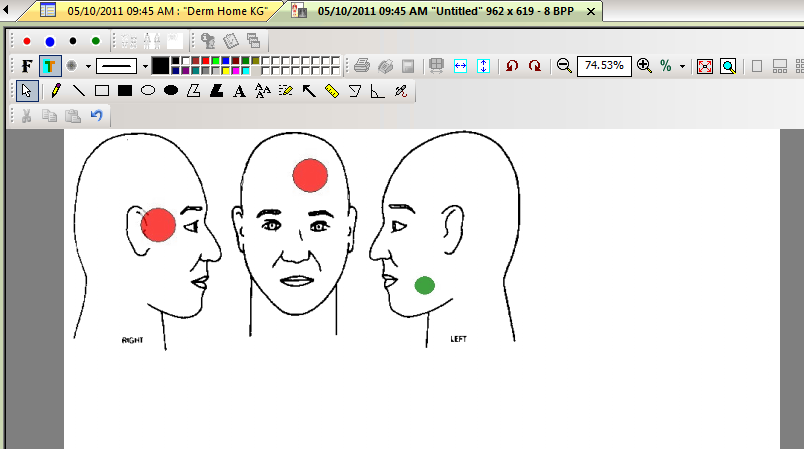
The problem is that this isn’t ready to go out the door. The body images included in NextGen are of various sizes. They do include pictures of what looks like real body parts with colored skin tone, muscle definition and shadowing, but most dermatologists would not be used to mapping on these types of images.
The NextGen trainers have a “how to setup” document written on an old version of NextGen back in 2008. The trainers also can e-mail you their four colored dots. This document teaches you how to create the toolbar embedded into the image window that allows you to select the different colored dots.
I found the colored dots to be of poor image creation, with some areas of transparency and some areas of white surrounding the colored dot.
I also think it would be easier to have many many different colored dots, even some labeled with text to indicate different lesion types. There could be a plain red dot, a red with ?BCC, a red with ?SCC, a red with ?NMSC (non-melanoma skin cancer). Then you could map on the body image a more accurate assessment.
Of course I’m going to revamp this feature!
See my updated post on what I did to streamline lesion mapping in NextGen.
 Protected by Patchstack